Medley AnimationSunday, July 20, 2008
The Droste MedleySaturday, July 19, 2008
Keeping up with PhotilitySunday, June 22, 2008
A Medley BannerThursday, February 7, 2008
Softpedia declares apps 'Clean'Sunday, February 3, 2008
Medley Gallery: Varying Tile SizesTuesday, December 4, 2007
Medley Gallery: Effect SamplesSaturday, November 24, 2007

Medley Animation

video

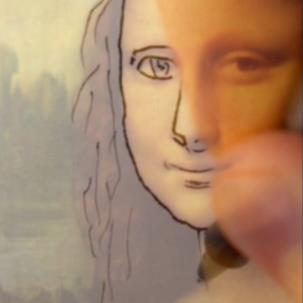
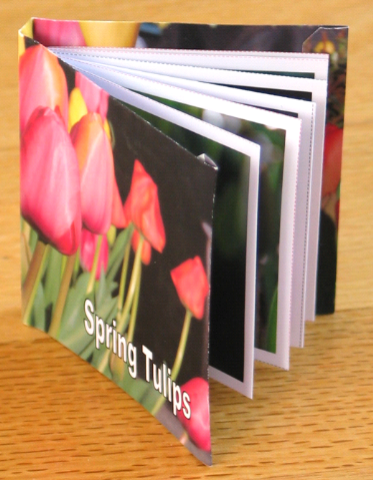
Here's another cool Medley effect I came across on Antonio's site. He used Cinema4D to create this short animation that illustrates how Medley images assemble.

Labels: ,

The Droste Medley

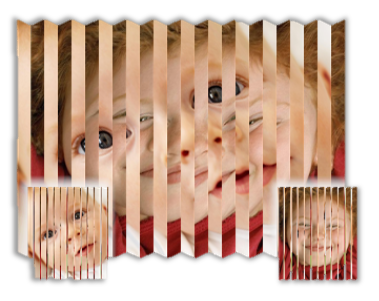
Antonio has pushed the envelope some more, using Picture Medley and PhotoShop and Ultra Fractal to create Droste-inspired images like this one.

You can find more images like this one on his web site.

Very cool!

Labels: ,

Keeping up with Photility

I've had a few people ask how to know when I post updates to tools or post new tools.

Someday I hope to have time to add an automatic mechanism to the programs so that they will upgrade themselves when new versions are posted. PictureMedley does this already. For now the rest are manual (you have to visit the web site and look for an update).

But the good news is that you can use RSS to automate that. I have Photility set up with an RSS feed and every time I post an updated version of a tool I write about it on the web site. If you have a subscription to the RSS feed the new post will show up in your reader automatically.

RSS is short for Really Simple Syndication. Here's a Wikipedia article with some background on RSS.

Depending on the web browser you’re using, you probably have RSS subscription capabilities already. Internet Explorer 7 incorporates RSS subscriptions into its Favorites/History bar. Firefox incorporates RSS subscriptions into its bookmarks toolbar. What’s cool is that the browser will check the site and see if anything is new, and let you know if it finds anything. Think of it like a “live bookmark” or “live favorite”.

clip_image002

To see what you’re working with, try clicking the RSS link in the top bar on photility (pictured above). If you’re running IE you’ll be taken to a page with this header:

clip_image004

If you’re running FireFox you’ll see this:

clip_image006

In either case, below the yellowish header you’ll see summaries of all of the recent posts to Photility.

Clicking subscribe in either case you’ll eventually end up with what appears to be a shortcut to Photility in a convenient place in the browser’s UI. (In IE it’s in the Favorites/History tab, and in FireFox it’s in a bookmarks toolbar). The cool part is when something new happens on one of those websites you’ll get some kind of “new” indicator telling you there’s been something new posted on the web site.

clip_image008

Here’s IE’s favorites tab – click the star (circled) to see this, then the “Feeds” button will show you the feeds you’ve subscribed to. If the entry is bold, there’s new content on that site.

Here’s FireFox’s bar – clicking on the feed name (photility) shows a dropdown menu of pages on the site.

clip_image010

This works with many websites – as you’re browsing watch this toolbar button – if it turns orange you’ll be able to subscribe to the site.

· IE: clip_image012

· Firefox: clip_image014

clip_image016

And of course there are many other ways of subscribing – many web portals (MSN, Yahoo, Live, Google) have RSS “aggregator” capabilities so that when you open your browser to its home page you can see what’s new on your favorite web sites. Or you can visit a site like BlogLines to manage them for you from any computer or mobile device. Microsoft Outlook has a nice RSS feed mechanism that makes RSS updates look like email messages so you can just review them while you’re reviewing your email.

Labels:

A Medley Banner


In a piece of email today, Erica asked whether it was possible to include words in a Medley, perhaps one for a web site banner.

Of course!

I started with Paint, and quickly laid out the text and logo. I saved the banner image, then started Picture Medley.

Checking the pixel dimensions of the Paint image (1025x296) I came up with an aspect ratio of 3.5 to 1. So I used the "Custom Print Size" option to choose a custom size of 5x18 for the overall medley. Looking at the grid overlay I could see the tiles weren't small enough, so I increased to 40 tiles on the longest side and generated a medley using my collection of flower photos. The result was difficult to see because my collection of flower photos is made up of fairly consistent exposures. By using the "Exposures" tweak I was able to increase the contrast of the resultin medley (the Exposures tweak increases the number of images to choose from for each tile by creating higher- and lower- contrast copies of the main tile images). The result is above.

Click on either image to see a higer-resolution version.

Labels: ,

Softpedia declares apps 'Clean'


I learned today that the folks over at Softpedia have discovered, tested, and indexed several of my apps in their database; which includes some amount of checking for utility and for viruses and security. You can check out their index of Photility apps here. Thanks Softpedia!

This certification is consistent with my goal of building clean and useful software, but as usual you should not take chances online. I do not know what rigorous level testing they do, so I offer the usual advice: make sure you have an up-to-date virus scanner protecting your system and monitoring anything you download from anywhere on the internet. Be safe out there!

Labels:

Medley Gallery: Varying Tile Sizes

PictureMedley doesn't currently support multiple tile sizes, but that hasn't stopped Ant over at Village9991! He accomplished this feat using PhotoShop.

  • First he generated 3 medleys using the same target and tile images.
  • For each medley he varied the setting for "Tiles on Longest Side", using values of 12, 24, and 48.
  • He then brought all 3 images into PhotoShop, placing them on separate layers. The 48-tile medley went to the bottom, and the 12-tile medley to the top.
  • By then selecting and subtracting tiles from the upper layers he was able to expose the smaller tiles underneath. He wisely chose to expose underlying tiles only where finer detail was required.
Very creative! (Click the picture to see some of his other similar work.)

Labels: ,

Medley Gallery: Effect Samples

PictureMedley includes a number of effects. Some are useful to help the target image show through, others are purely for fun. Click each thumbnail to see a larger size. Each of these is built from the same set of flower photo tiles, using the application's icon as the target image. The "use target as tile" option was selected, and you should be able to find the icon in each of these medley images.

Click each sample image to see it in a higher resolution.


None - This is the no frills basic medley.
Float - Tiles are a little smaller and float in front of the target image. This allows the target image to show through between the tiles, helping the target image resolve itself more easily. Tiles are still 100% opaque, so the majority of the medley stands entirely on its own. If you don't have quite enough tiles or the ones you have don't match the color of the target image so well, and you're having a hard time getting the medley to look close to the target, the tiny bit of image in the gap between tiles provides a strong and subliminal hint about the target image.
Frost - Imagine the tiles being slightly transparent. This effect combines the simplicity of "None" with the subliminal hint from Float to produce a subtle improvement to the quality of the resulting medley. This has the effect of tinting the tiles ever so slightly toward the target image. I think it's cheating but it's subtle and it can save the day if your tile images don't have just the right colors to match your target image.
Raised - Tiles have a subtle highlight and shadow, providing an illusion that the tiles are three-dimensional.
Glass - Tiles have a subtle glossy appearance, providing an illusion that the tiles are made of glass.
Marbles - Tiles are rendered inside overlapping glass marbles. Be warned - this one takes a relatively long time to draw!
Lenses - Tiles are overlaid with a magnifying glass. I discovered that if I drew the marble in front of each tile in the default effect (no effect) they looked like little magnifying lenses.
Simple Overlap - Tiles will overlap each other. Using this option creates a more organic looking medley by allowing tiles the opportunity to align more closely with the target image.
Circles with Shadow - Tiles overlap but are cropped to circles (or ellipses) with drop-shadows to create an interesting effect akin to printing the tile images on coins and tossing them in a pile.
Blended Circles - Tiles overlap but are rendered with a feathered circular edge, creating an interesting effect akin to a watercolor painting. This is one of my favorites for medleys about vacations since the way the tile images blend into one another reminds me of the way my mental imagery from the vacation blend together in my mind.
Puzzle - Tiles are cropped and laid out with a jigsaw puzzle outline, producing a fun effect.
Custom - Splat (with shadow) - This is one of two user-specified effects. The user-specified mask is applied to each tile, and tiles are laid out overlapping 50% with a drop shadow. PictureMedley includes several pre-defined masks, and you can easily create your own using your favorite drawing software.
Custom - Chalk Stroke (without shadow) - The other user-specified effect. A user-specified mask is applied to each tile, and tiles are laid out overlapping 50% with no drop shadow.

Labels: ,